
Choosing the right kitchen planning software can save time and avoid costly mistakes. The best tools help you design kitchens easily and clearly.
Kitchen planning software lets you create layouts and visualize your space before building or remodeling. These programs offer features like 3D models, drag-and-drop design, and material lists. Some software is simple for beginners, while others suit professionals like architects and contractors.
Many options work on Windows and Mac, giving flexibility. Using these tools helps plan cabinets, appliances, and lighting perfectly. It also ensures efficient use of space and budget. This guide covers top kitchen planning software, including Sweet Home 3D, DreamPlan, and Home Designer Suite. You will learn their key features, ease of use, and compatibility. This way, you pick the best software for your kitchen project.
Sweet Home 3d
![Sweet Home 3D [PC Download]](https://m.media-amazon.com/images/I/81mqySxP8uL._SL500_.png)
Sweet Home 3D [PC Download] is an ideal choice for homeowners, interior designers, and DIY enthusiasts looking to create detailed and realistic 3D home plans easily on their computer. This software is perfect for those who want to visualize their interior design ideas without professional help, offering a user-friendly interface combined with powerful features.
Pros:
- Easy-to-use drag-and-drop interface for designing floor plans.
- Comprehensive 3D visualization to see designs in real-time.
- Supports importing additional furniture models and textures.
- Allows precise customization of room dimensions and furniture placement.
- Plus edition includes advanced features and extended furniture catalog.
Cons:
- Limited rendering options compared to professional CAD software.
- Some advanced features require a learning curve for beginners.
- Performance may vary depending on PC specifications.
Sweet Home 3D offers an intuitive platform where users can draw walls, add doors and windows, and arrange furniture effortlessly. The Plus edition enhances this experience by providing a broader range of customizable furniture and textures, allowing users to create highly personalized interior layouts. Its real-time 3D preview helps users instantly visualize changes, making the design process more interactive and efficient.
Additionally, this software supports importing external 3D models, which expands the creative possibilities for users who want to incorporate unique furnishings or architectural elements. The ability to export high-quality images and videos of the designs is a valuable feature for presentations or sharing ideas with clients or family members. Overall, Sweet Home 3D combines ease of use with powerful tools, making it a versatile solution for anyone interested in home design.
Dreamplan Home Design And Landscaping Software
![DreamPlan Home Design and Landscaping Software Free for Windows [PC Download]](https://m.media-amazon.com/images/I/51kvZH2dVLL._SL500_.jpg)
The DreamPlan Home Design and Landscaping Software Free for Windows is ideal for homeowners, DIY enthusiasts, and amateur designers looking to create and visualize their dream home or garden layout on their PC. If you want an easy-to-use yet powerful tool to experiment with interior and exterior designs without professional experience, this software by NCH Software is perfect for you.
Pros:
- Intuitive interface suitable for beginners and hobbyists
- Comprehensive tools for home design and landscaping
- Free to download and use on Windows PC
- Supports 3D visualization for realistic project previews
- Allows customization of floor plans, interiors, and outdoor spaces
Cons:
- Limited advanced features compared to professional-grade software
- Windows-only edition, not available for Mac or mobile devices
- Some users may experience a learning curve with detailed landscaping tools
The DreamPlan Home Design and Landscaping Software by NCH Software offers a versatile platform for creating detailed floor plans, designing interiors, and landscaping your outdoor spaces on your PC. Its user-friendly layout and free availability make it accessible for anyone wanting to explore home design without investing in costly programs. The software supports 3D visualization, which helps users see realistic representations of their projects, enhancing planning and decision-making.
With features like customizable room layouts, furniture placement, and garden planning, DreamPlan allows users to experiment with various design ideas easily. This flexibility benefits users by saving time and money, as they can visualize renovations or new builds before actual implementation. While it may lack some advanced capabilities of professional tools, its focus on simplicity and essential features makes it a valuable resource for personal use on Windows PCs.
Sweet Home 3d
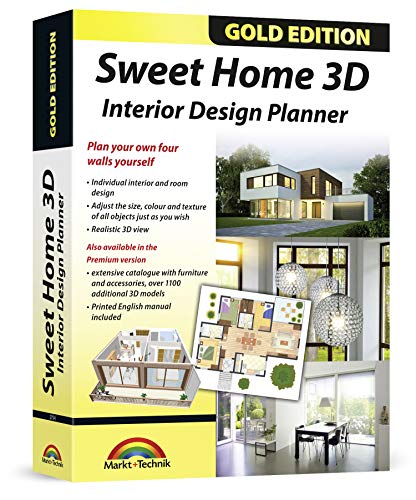
The Sweet Home 3D – Interior Design Planner is perfect for architects, interior designers, and planners who need a comprehensive and user-friendly tool to create detailed home designs. It is also suitable for hobbyists who want to visualize their home improvement projects with precision and creativity. Compatible with multiple operating systems including Windows 11-10-8-7-Vista-XP and MAC, this planner offers a versatile solution for a wide range of users.
Pros:
- Includes an additional 1100 3D models for diverse design options
- Comes with a printed manual to help users navigate features easily
- Compatible with multiple operating systems, enhancing accessibility
- Intuitive interface suitable for both professionals and beginners
- Allows precise interior layout planning with detailed customization
Cons:
- May require a learning curve for users unfamiliar with design software
- 3D rendering performance can depend on computer hardware
- Limited advanced architectural features compared to specialized CAD software
The Sweet Home 3D Interior Design Planner stands out due to its extensive library of over 1100 3D models, enabling users to experiment with furniture, fixtures, and decor to create realistic home designs. This vast selection enhances creativity and helps users visualize their concepts in a detailed and professional manner. The inclusion of a printed manual further supports users by providing step-by-step guidance, making it easier to learn and utilize all the features effectively.
Designed by Markt + Technik, this planner supports a wide range of Windows versions as well as MAC, ensuring that users can work on their preferred platform without compatibility issues. Its user-friendly interface allows architects and planners to draft precise floor plans quickly, while the 3D visualization helps communicate ideas clearly to clients or team members. Overall, this tool balances functionality and accessibility, making it an excellent choice for anyone involved in interior design and planning.
Home Designer Suite

The Home Designer Suite – PC Download is perfect for homeowners, DIY enthusiasts, and amateur architects who want to design and remodel their living spaces with professional-level tools. If you are looking to create detailed floor plans, visualize home improvements, or experiment with interior design, this software offers an accessible yet powerful solution tailored to your needs.
Pros:
- User-friendly interface ideal for beginners and non-professionals
- Comprehensive design tools for floor planning, landscaping, and remodeling
- High-quality 3D visualization to preview projects realistically
- Extensive library of architectural objects and materials
- Instant PC download for quick access and installation
Cons:
- Requires a relatively powerful PC to run smoothly
- Some advanced features may have a learning curve for new users
- Limited support for Mac users, as it is PC download only
The Home Designer Suite by Chief Architect offers a robust set of features that empower users to take full control of home design projects. With its intuitive tools, users can easily draft floor plans, experiment with different layouts, and customize every detail from walls to windows. The software’s rich object library and material options allow for highly personalized designs, making it simple to match any style or preference.
Additionally, the suite’s advanced 3D rendering capabilities provide users with immersive views of their projects, helping to visualize changes before any physical work begins. This feature not only enhances creativity but also helps avoid costly mistakes. Overall, the Home Designer Suite – PC Download is a versatile and practical choice for anyone serious about transforming their living space with confidence and precision.
Around The Kitchen Table Best Seller Cookbook

The Around The Kitchen Table Best Seller Cookbook is perfect for anyone looking to enhance their culinary skills with practical and delicious recipes. Whether you’re a beginner just starting out, a seasoned cook seeking new ideas, or someone following a kosher diet, this cookbook offers outstanding recipes using basic ingredients that fit everyday cooking needs. Men and women alike will find this book an invaluable resource for creating wholesome meals without the fuss.
Pros:
- Contains 512 pages packed with a wide variety of practical recipes
- Focuses on using basic, easily accessible ingredients
- Suitable for all skill levels, from beginners to experienced cooks
- Specially tailored for kosher cooking requirements
- Published by trusted manufacturer YIDDISH OITZROSS in 2021
Cons:
- Large page count might be overwhelming for those seeking quick reference
- Primarily focused on kosher cuisine, which may limit appeal to some audiences
This cookbook stands out by combining the richness of traditional kosher recipes with the practicality of everyday cooking. The extensive 512 pages offer a diverse range of dishes that rely on simple ingredients, making it accessible for those who don’t have a fully stocked pantry. Users benefit from clear instructions and recipes that encourage creative yet straightforward meal preparation, perfect for busy households.
Moreover, the book’s design caters to a broad audience, including men and women of all experience levels. Its focus on kosher dietary laws ensures that those following this lifestyle have a reliable resource for maintaining their cooking standards. The publication date of 2021 guarantees up-to-date content aligned with modern cooking trends, helping users stay current while enjoying classic flavors.
Embrilliance Stitchartist Level 3

The Embrilliance StitchArtist Level 3 Digitizing Embroidery Software for Mac & PC is ideal for advanced embroidery enthusiasts and professional designers who want to create intricate, customized embroidery patterns. If you are looking to elevate your embroidery projects with precise digitizing tools and advanced editing capabilities, this software offers the perfect solution for both Mac and PC users.
Pros:
- Advanced digitizing tools for detailed and professional designs
- Compatible with both Mac and PC operating systems
- Offers extensive editing features for customizing embroidery patterns
- User-friendly interface despite its powerful capabilities
- Supports multiple stitch types for versatile embroidery options
Cons:
- Steeper learning curve for beginners new to digitizing software
- Higher price point compared to basic embroidery software
- Requires a reasonably powerful computer to run smoothly
The Embrilliance StitchArtist Level 3 provides a comprehensive set of features that allow users to create complex embroidery designs with precision. Its ability to convert artwork into stitch data empowers users to bring unique and creative ideas to life, whether for personal projects or professional use. The software’s compatibility with both Mac and PC ensures that a wide range of users can access its powerful tools without platform restrictions.
With an intuitive yet robust design environment, users can manipulate stitches, adjust stitch directions, and modify fills to achieve the desired texture and appearance. This level of control enhances the quality of embroidery output and enables customization that meets individual or client specifications. Overall, the software’s advanced capabilities combined with its versatility make it a valuable investment for serious embroidery designers.
Embrilliance Stitchartist Level 1

The Embrilliance StitchArtist Level 1, Digitizing Embroidery Software is perfect for hobbyists and small business owners who are passionate about creating custom embroidery designs. If you are someone who enjoys crafting and wants to take your embroidery projects to the next level with unique, personalized designs, this software is an ideal choice for you.
Pros:
- User-friendly interface makes it easy for beginners to navigate.
- Compatible with both Mac & PC, offering flexibility in usage.
- Provides comprehensive tools for basic digitizing needs.
- Offers seamless integration with other Embrilliance products.
Cons:
- Limited to basic digitizing features; may not suffice for advanced users.
- Requires a learning curve for those new to embroidery software.
The Embrilliance StitchArtist Level 1 offers a variety of features that cater to beginners and those looking to enhance their embroidery skills. The software includes an intuitive drag-and-drop interface, making it straightforward to import and modify designs. Users can easily convert artwork into stitch files, allowing for a high degree of customization and creativity.
Additionally, the software’s cross-platform compatibility ensures that it can be used on both Mac & PC, providing flexibility for users regardless of their preferred operating system. This compatibility is complemented by seamless integration with other Embrilliance products, making it a versatile addition to any embroidery toolkit. Whether you’re working on a simple monogram or a more intricate design, this software offers the necessary tools to bring your creative visions to life.
Kitchen Contractor
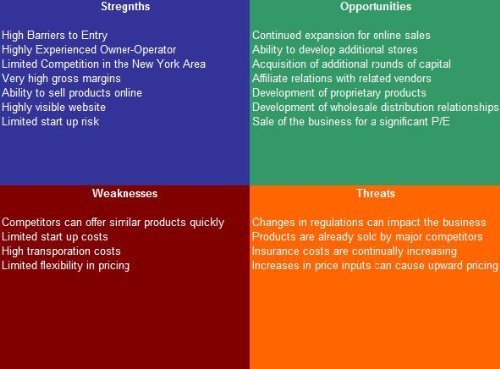
The Kitchen Contractor SWOT Analysis Plus Business Plan is an ideal purchase for aspiring entrepreneurs and small business owners in the kitchen remodeling industry. Whether you’re looking to start a new venture or expand an existing business, this comprehensive plan provides the strategic insights and tools necessary to navigate the competitive market effectively. It is tailored for those who want to understand their business environment, identify strengths and weaknesses, and capitalize on opportunities while mitigating threats.
Pros:
- Provides a detailed SWOT analysis to help businesses identify critical areas of focus.
- Comprehensive business plan that covers market trends, financial projections, and strategic initiatives.
- Tailored specifically for the kitchen contracting industry, ensuring relevant insights and strategies.
- Developed by SWOTAnalysisDB, a trusted name in business strategy planning.
Cons:
- May not be suitable for those outside the kitchen remodeling sector.
- The depth of information may be overwhelming for novices unfamiliar with business planning concepts.
The Kitchen Contractor SWOT Analysis Plus Business Plan offers a plethora of features designed to empower business owners. With its detailed market analysis, users can gain a clear understanding of current trends and consumer preferences. This knowledge enables them to make informed decisions that align with market demands, ensuring business sustainability and growth. Additionally, the plan includes financial projections that provide a roadmap for revenue targets and budget management, helping entrepreneurs to allocate resources efficiently.
Another notable feature is the inclusion of strategic initiatives tailored to the kitchen contracting industry. These initiatives guide users in implementing effective marketing strategies and operational improvements, thereby enhancing their competitive edge. By leveraging this business plan, contractors can not only streamline their operations but also position themselves as leaders in their field. The support from SWOTAnalysisDB ensures that users have access to professional insights and expertise, which can be a game-changer in achieving business objectives.
How To Get To The Top Of Google: The Plain English Guide To Seo

This book is ideal for small business owners, digital marketers, and entrepreneurs who want to improve their website’s visibility on Google without getting lost in complex jargon. If you’re looking for a straightforward, practical guide to mastering SEO and boosting your online presence, “How To Get To The Top of Google: The Plain English Guide to SEO” is designed just for you.
Pros:
- Written in clear, plain English, making SEO concepts easy to understand.
- Comprehensive coverage of key SEO strategies and techniques.
- Published recently in 2023, ensuring up-to-date information.
- Compact and portable with 302 pages, ideal for quick reference.
- Authored by Exposure Ninja, a trusted name in digital marketing.
Cons:
- Might be too basic for advanced SEO professionals.
- Focuses mainly on Google, with less emphasis on other search engines.
- Available only in digital format, which may not appeal to all readers.
This guide simplifies the often overwhelming world of SEO by breaking down complex tactics into manageable steps. Its focus on practical application helps readers implement changes immediately, improving website rankings and attracting organic traffic. The dimensions and weight make it a convenient digital resource that can be accessed on various devices, ensuring learning on the go.
With detailed insights into keyword research, content optimization, and link-building strategies, this book empowers users to take control of their digital marketing efforts. By following the proven methods outlined in the book, readers can expect to see tangible benefits such as increased visibility, higher search engine rankings, and ultimately, more business growth.
Frequently Asked Questions
What Is The Best Free Kitchen Planning Software For Windows?
DreamPlan Home Design and Landscaping Software is a top free option for Windows. It offers easy drag-and-drop tools. Beginners and pros can design kitchens quickly with 3D visualization and landscaping features.
How Does Sweet Home 3d Enhance Kitchen Design?
Sweet Home 3D provides 1100+ 3D models and a printed manual. It supports Windows and Mac. This software is ideal for architects and planners needing detailed interior design tools.
Is Home Designer Suite Suitable For Kitchen Remodeling?
Yes, Home Designer Suite is perfect for kitchen remodeling. It offers advanced tools for layout, cabinetry, and appliances. It supports detailed floor plans and 3D walkthroughs for accurate project visualization.
Can Kitchen Planning Software Integrate With Contractor Business Plans?
Yes, some software supports contractor SWOT analysis and business planning. This helps streamline project management and budgeting, improving kitchen design efficiency and client satisfaction.
What Features Make Kitchen Software Ideal For Professionals?
Professional kitchen software should have extensive 3D models, precise measurements, and printable manuals. Compatibility with multiple OS and easy export options also boost workflow efficiency.
How Can Kitchen Planning Software Improve Home Cooking Experiences?
By visualizing kitchen layouts, software helps optimize space and appliance placement. This leads to better workflow, easier cooking, and a more enjoyable kitchen environment.
Conclusion
Choosing the right kitchen planning software can make your project easier and more fun. Programs like Sweet Home 3D and DreamPlan offer simple tools for beginners and experts alike. Home Designer Suite gives detailed options for those who want more control.
These tools help you see your ideas in 3D before you start building. Planning saves time, money, and avoids mistakes. Remember to pick software that fits your skill level and needs. Also, consider if you want free or paid versions.
A good plan helps you create the kitchen you dream of. Start small, explore features, and enjoy designing. The right software turns your vision into a clear, easy plan. This way, cooking and living in your new kitchen will be a real pleasure.

Sophie Hartwell is the founder of KitchenQuik.com, where she shares kitchen tips, smart cooking hacks, and the best product picks to make everyday cooking easier and more enjoyable.